
Webhooks allow an application to instantly notify another application when a certain event occurs, rather than constantly polling for new data.
Think of it like waiting for a retailer to stock the latest edition of a popular board game. Instead of calling the store repeatedly to check, they call you the moment it arrives, saving both you and the retailer a lot of time.
In the same way, a webhook enables one system to automatically alert another system when something important happens. Rather than constantly asking, "Has it arrived yet?" (polling), the system simply waits for a phone call (the webhook) when the event occurs.
Some real-world examples...
-
When a customer pays for an order, a webhook automatically marks the order as Paid
-
When expense reports are submitted, a webhook instantly notifies managers to review them
-
When inventory drops below a set threshold, a webhook alerts the purchasing system to restock
By eliminating unnecessary requests, webhooks reduce server load, improve efficiency and lower operational costs.
Updating a webhook's status
-
On the AMS menu, click Admin > Notifications > Notification Settings.
-
In the Notification Type field, select WEBHOOK to narrow down the list displayed.
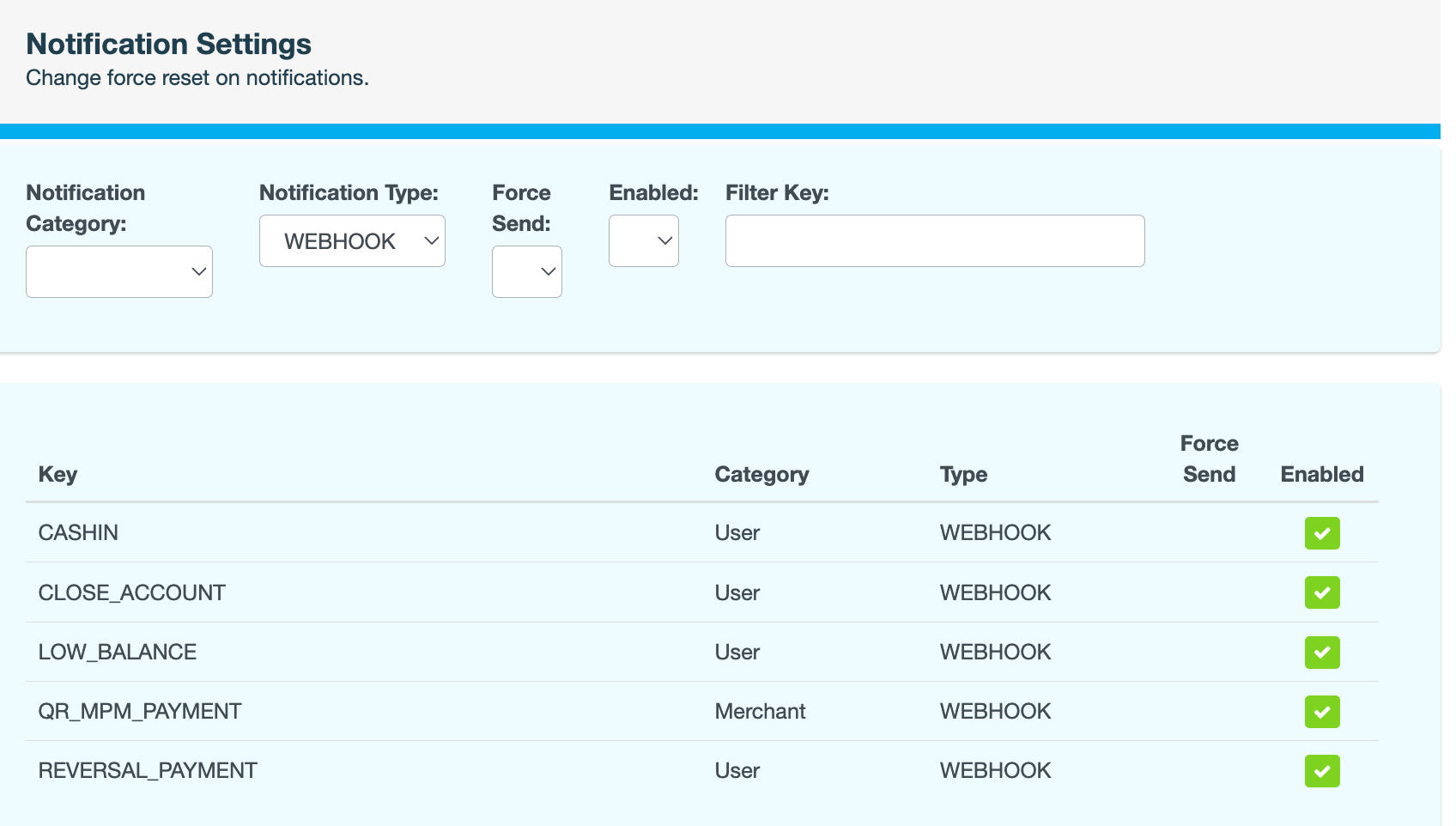
-
Locate the webhook you want to update, then click the icon in the Enabled column to change its status.
-
Enter a reason for the change, then click CONFIRM. The icon changes to indicate whether the webhook is now enabled (

